 capcutx.app
CapCut APK › CapCut Mod APK
CapCut Mod APK: Is It Safe to Download?
Search for CapCut and you'll find dozens of sites offering a "CapCut Mod APK" or "CapCut Pro APK unlocked". They promise every premium effect for free. Here's what you actually get, and the safer option.
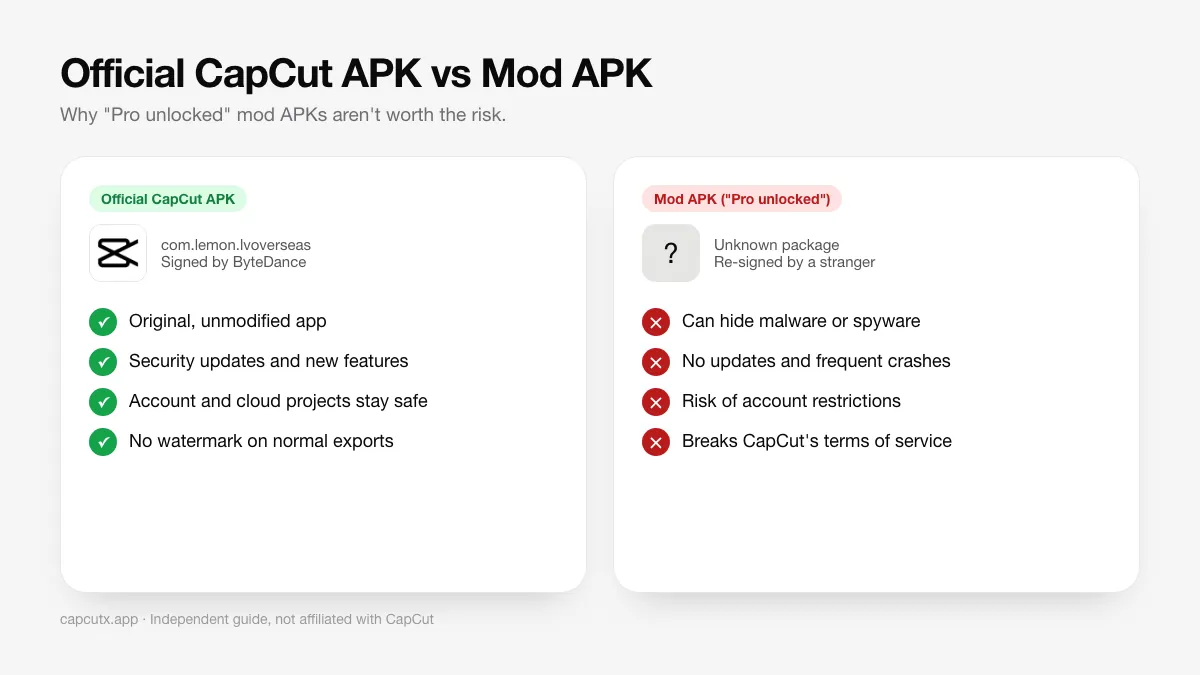
What is a CapCut Mod APK?
A mod APK is the official app after a third party has decompiled it, changed the code (usually to skip Pro checks), and rebuilt it. Because they can't use ByteDance's private signing key, the modder signs it with their own key. That means:
- Android treats it as a different developer's app.
- Anything could have been added to the code, and you can't check.
- It can't update from Google Play or the official APK.
5 real risks of CapCut Mod APKs
1. Malware and spyware
Security researchers regularly find popular "modded" apps bundled with adware, crypto-miners, SMS fraud and info-stealers. A video editor already has access to your photos, videos and microphone, which makes it a valuable target.
2. Stolen accounts
Many mods ask you to log in with TikTok, Google or Facebook. A tampered login screen can capture those credentials.
3. Account restrictions
Modified clients can be detected. Accounts using them risk losing cloud space, templates or access altogether.
4. Crashes and lost projects
Mods break whenever CapCut updates its servers. Templates and effects often stop loading, and drafts can become corrupted.
5. It's piracy
Unlocking paid features without paying breaks CapCut's terms of service and denies the developers income.
Safe ways to get "Pro" features
- Use the free tier well: the free CapCut APK includes 4K export, auto captions, keyframes, chroma key, speed curves and thousands of effects.
- Try CapCut Pro: CapCut often offers a free trial. See CapCut Pro: price and features.
- Free alternatives: some features locked in CapCut are free in other apps. See CapCut alternatives.
- Remove the watermark legally: here's how.
Already installed a mod? Do this
- Uninstall the mod (Settings → Apps → CapCut → Uninstall).
- Run a Google Play Protect scan (Play Store → profile → Play Protect → Scan).
- Change passwords for any account you signed into through the mod, and turn on two-factor authentication.
- Install the official CapCut APK.
Frequently asked questions
Is CapCut Mod APK legal?
No. Mod APKs that unlock paid features change CapCut's software without permission and break its terms of service. Distributing them can also infringe copyright.
Can CapCut Mod APK hack my phone?
It can. A modded APK is re-signed by an unknown person and can include any code, such as adware, spyware or password stealers. You have no way to check what was added.
Is there a CapCut Pro APK without a watermark?
You don't need one. The official free CapCut APK already exports without a watermark. See our guide on removing the template ending clip.
Will I get banned for using CapCut Mod APK?
Modified clients can be detected, and accounts using them may be restricted or lose access to cloud features.
Related guides
 How to Install CapCut APKStep-by-step guide to install the CapCut APK on any Android phone, tablet, Huawei device or Android TV, plus fixes for 'App not installed' and parsing errors.
 CapCut for PCDownload CapCut for PC free on Windows 10, Windows 11 and macOS.
 CapCut ProWhat do you get with CapCut Pro? Compare CapCut Free vs Pro features, how to check the price in your country, the free trial, and how to cancel.
 CapCut for iPhone & iPadHow to download CapCut on iPhone and iPad from the App Store, what to do if it's not available in your region, requirements, and iOS vs Android differences.
 CapCut TemplatesHow to find and use trending CapCut templates on Android and iPhone, how to edit them, export without the logo, and why templates sometimes don't show.
 CapCut Without WatermarkExport CapCut videos without a watermark for free.