CapCut APK › CapCut Not Working
CapCut Not Working? 12 Fixes That Actually Work
CapCut crashing, freezing, stuck on export, or not loading templates? Work through these fixes in order. Most problems are solved by the first five.

CapCut APK Download
- Version
- Latest
- Size
- 305 MB
- Platform
- Android
- Price
- Free
Served directly from CapCut's official download server. capcutx.app doesn't host or modify files and isn't affiliated with CapCut or ByteDance.
Quick fixes
1. Restart the app and your phone
Force close CapCut (Settings → Apps → CapCut → Force stop), restart the phone, and try again.
2. Update CapCut
Old versions stop working when CapCut changes its servers. Install the latest CapCut APK over your current one. Your drafts are kept.
3. Clear CapCut's cache
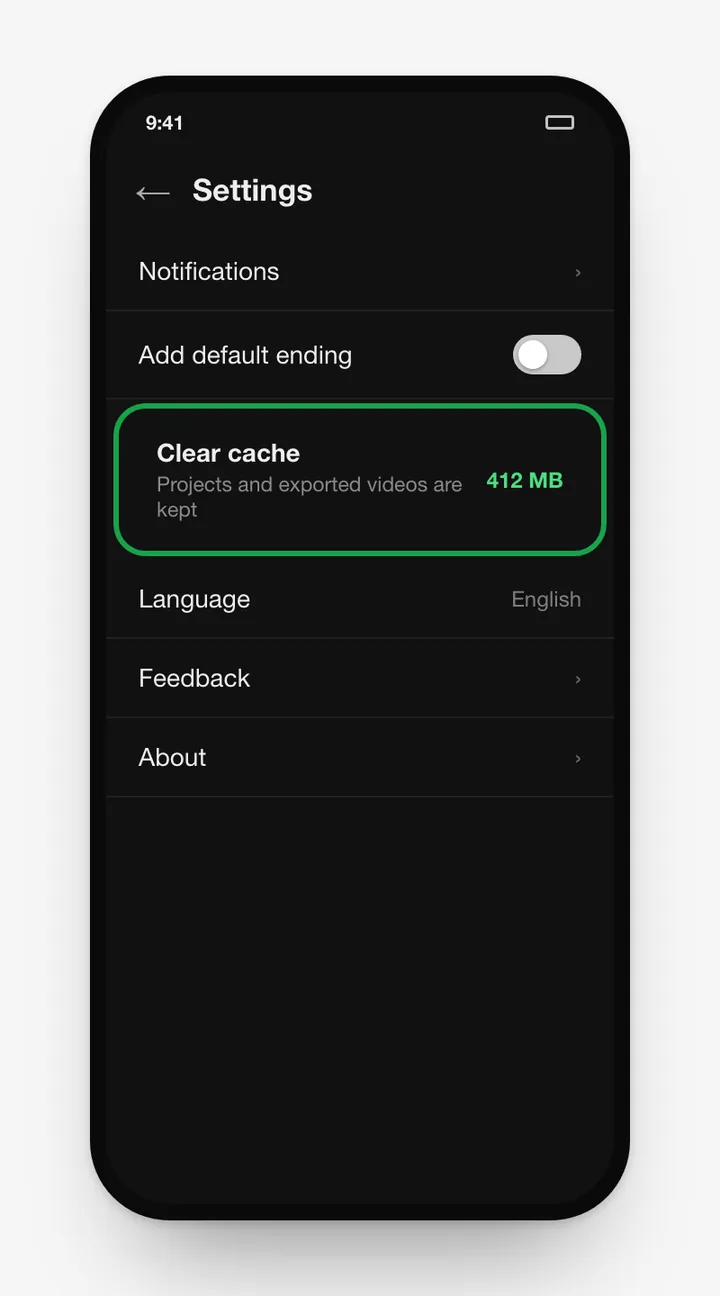
In CapCut: Settings → Clear cache. Or Android: Settings → Apps → CapCut → Storage → Clear cache. Don't tap "Clear data" unless your drafts are backed up.
4. Free up storage
Editing and exporting need several GB free. Delete old exports and unused apps.
5. Check your internet
Templates, effects, fonts, music and AI tools are all downloaded on demand. Switch between Wi-Fi and mobile data to test.
Crashing and lag
6. Close background apps
CapCut needs a lot of RAM. Close games, browsers and other heavy apps.
7. Lower preview quality
Editing at 720p preview and exporting at 1080p makes a big difference on mid-range phones.
8. Split huge projects
Projects with dozens of layers or 4K clips can overload your phone. Export sections separately and join them.
Export problems
9. Export stuck or failed
Keep the screen on, disable battery saver for CapCut, and try a lower resolution or frame rate.
10. Video has no sound after export
Check that no clip or track is muted, and that copyrighted music isn't being removed when sharing to social platforms.
Other issues
11. "Templates not available" / features missing
Some features depend on your region and account age. Update the app, sign in, and check your connection. See CapCut templates.
12. "App not installed" when updating
A different-signature version (often a mod) is installed. Uninstall it and install the official APK. Full steps are in our install guide.
Frequently asked questions
Why does CapCut keep crashing?
The usual causes are low RAM, an outdated app, a corrupted cache or a very heavy project. Clear the cache, update CapCut and close other apps.
Why is CapCut export stuck at 99%?
Usually low storage or the phone killing the app in the background. Free up space, keep the screen on, and export at a lower resolution.
Is CapCut down right now?
If templates, effects and login all fail at once on several devices, CapCut's servers may be having trouble. Wait a while, or check CapCut's official social accounts.
Will reinstalling CapCut delete my drafts?
Yes. Uninstalling removes local drafts. Back up important projects to CapCut's cloud space first, then reinstall.
Related guides
 How to Install CapCut APKStep-by-step guide to install the CapCut APK on any Android phone, tablet, Huawei device or Android TV, plus fixes for 'App not installed' and parsing errors.
 CapCut for PCDownload CapCut for PC free on Windows 10, Windows 11 and macOS.
 CapCut Mod APKThinking of downloading CapCut Mod APK or CapCut Pro APK unlocked? Learn the real risks (malware, bans, data theft) and safe ways to get Pro features.
 CapCut ProWhat do you get with CapCut Pro? Compare CapCut Free vs Pro features, how to check the price in your country, the free trial, and how to cancel.
 CapCut for iPhone & iPadHow to download CapCut on iPhone and iPad from the App Store, what to do if it's not available in your region, requirements, and iOS vs Android differences.
 CapCut TemplatesHow to find and use trending CapCut templates on Android and iPhone, how to edit them, export without the logo, and why templates sometimes don't show.